Find and manage your ads
Every ad you have posted, with its status and how many people saw it.
One list holds everything you have posted, so you never have to guess whether an ad is actually live.
Reading your ad list
Step 1: Open the menu at the top of the page and choose My Ads. Everything you have posted is listed there — live ads, ads still being checked, and ads that have run out.
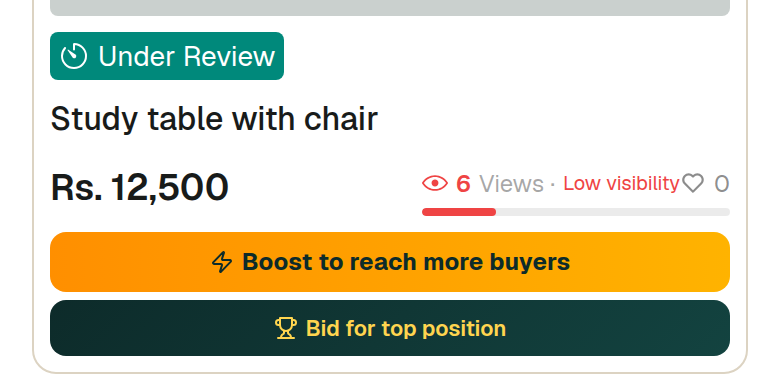
Step 2: The coloured tag on each ad is its status. Live means buyers can see it and it turns up in search. Under review means the team is still checking it. Expired means its time ran out and it is hidden now.
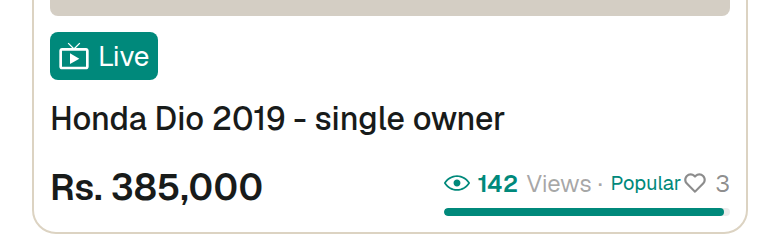
Step 3: The bar under the price counts how many people opened that ad, and puts a word to the number. Under ten views means almost nobody has seen it — that is far more often a photo and title problem than a price problem.
Step 4: The panel at the top adds every ad together: total views, how many listings you have, and which one is doing best. Look at it once a week, not every day.

Step 5: Tap any ad to open it. That page is where you edit it, hide it, renew it or mark it sold.
What this cannot do
- Under review is normal for a new ad and is not a rejection — ads are checked before they go live.
- The view count is the number of times the ad page was opened. It does not tell you who opened it.
- The boost buttons that appear on a quiet ad cannot be paid for yet. Payments are not switched on.
Watch out for
- Do not judge an ad on its first day. Give it a few days of views before you change anything.
- Deleting an ad is permanent. If you only want it out of sight for a while, hide it instead — a hidden ad can be switched back on.